SmartZipView
Stream Videos & PDFs Directly From 7z/ZIP — No Extraction, No Temp Files
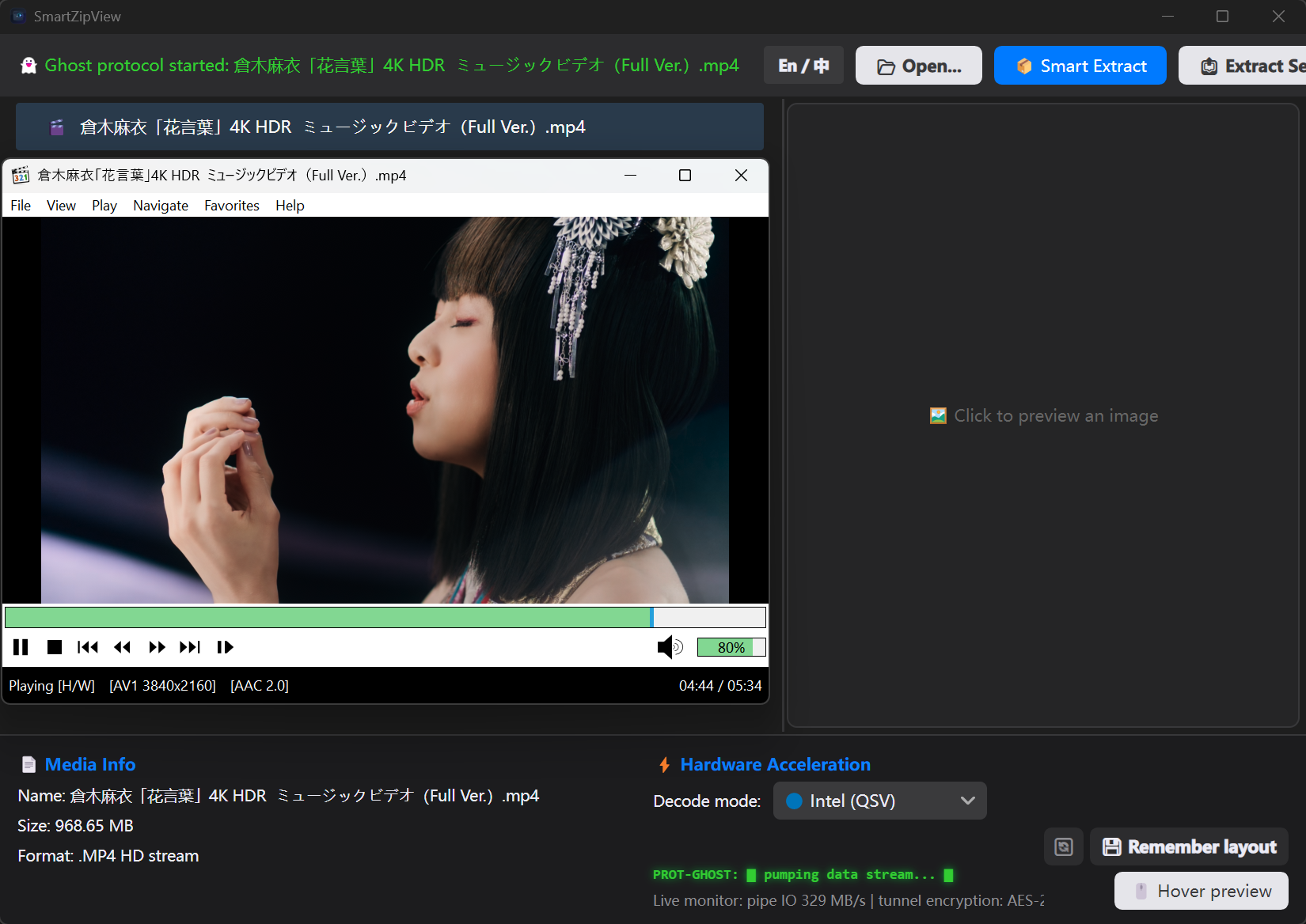
SmartZipView — browse, stream & read inside 7z/ZIP archives, zero extraction.
🛡️ The Privacy Philosophy
Traditional archive managers extract multi-GB archives to disk first — wasting time, disk I/O and SSD lifespan. SmartZipView changes the rules: media inside `.7z` / `.zip` archives is fed to the decoder / renderer through in-memory pipes in real time. No full extraction. Zero temporary files in the happy path.
⚡ Stealth Engines
In-Archive Video Playback
Double-click a video inside the archive — ffplay decodes straight from a memory pipe with GPU hardware acceleration (QSV / CUDA / D3D11VA). Requires the optional FFmpeg download (see below).
Ghost PDF Reader
Fullscreen dual-page reader powered by Rust + Pdfium: LRU page cache, parallel rendering and aggressive preloading. No extraction required.
Ghost Stream Server
Local HTTP Range server streams archive content to any external player (PotPlayer, MPC-HC, mpv…) with full seek support. MPC-HC is the recommended free player.
ZSTD-Ready Engine
NanaZip Core engine (ABI-compatible 7z.dll) opens, browses and plays ZSTD-compressed `.7z` containers that stock 7-Zip cannot.
🚀 Pro Performance
Built for serious archive collectors. SmartZipView turns your `.7z` / `.zip` vault into a media library — browse images, play videos and read PDFs without ever unpacking the container.
- Zero-Disk Footprint: No temp files — media streams through memory pipes only.
- 8K Image Viewer: Fullscreen preview with 0.1×–50× zoom and drag-pan.
- Smart Password Gate: Auto-detects encrypted entries, verifies in memory, no more false password popups.
- Bilingual UI: Switch between English and 中文 in one click.
0.8 BETA — STABLE BUILD DEPLOYED
Download SmartZipView 0.8 Beta (.zip)Windows x64 | Portable .zip (single-file exe + native plugins) | Self-Contained (C# .NET 11 + Rust PDF engine) | No Install — just unzip & run
🎬 Optional: FFmpeg (for in-archive video playback)
Video playback & thumbnails need ffmpeg.exe / ffplay.exe. The app works
fully without them (archives, images, PDFs, extraction) — only video is disabled. Download from the
official source and place the two exes inside the app folder:
Infrastructure\Binaries\ffmpeg.exe · ffplay.exe
→ Official FFmpeg Downloads | gyan.dev full build
🎯 Recommended external player: MPC-HC
For the best experience, hand the in-archive URL to MPC-HC (2.7.4) — a free, open-source, hardware-accelerated Windows player — through SmartZipView's Ghost Stream Server tunnel.