One crash code. One stubborn game engine. One weekend that turned into a project.
The game we all love (and love to rage at)
Resident Evil 5 came out in 2009. It's built on Capcom's MT Framework engine, and underneath all the sheep shearing and Chris Redfield's biceps, it's a DirectX 9 game from an era when Windows XP was still common and "4K" wasn't a thing anyone said out loud.
Fast forward to 2026. The game is still on Steam. People still buy it, still replay it, still want to see it run at its best. And it still crashes. Constantly. On machines that are a hundred times more powerful than anything that existed when it shipped.
I'm the person a lot of those players eventually find in a forum thread or a Steam discussion, and I've read the same story a hundred times:
"Bought RE5, installed the HD pack, launched the game, black screen / instant crash / 0x0000007e. I've tried everything. Can I get a refund?"
So let me tell you why that happens, and why — after years of watching people struggle — I finally sat down and built a tool to fix most of it automatically.
First, let's be fair to the game
Before I vent, some credit where it's due: MT Framework was genuinely impressive for its time. It powered RE5, Lost Planet, Devil May Cry 4, Dragon's Dogma. Capcom squeezed a lot out of the Xbox 360/PS3 generation with it.
But "impressive for its time" is exactly the problem. The engine was never designed for the world it now has to live in. It makes assumptions that are baked in at a very deep level:
- It assumes a monitor will report a reasonable, small number of display modes.
- It assumes your CPU has a sensible core count.
- It assumes certain DLLs from 2009 still exist on your system.
- It assumes 2GB of address space is plenty.
None of those assumptions are true anymore. And here's the kicker: Capcom gave this game a "Gold Edition" re-release, but the engine underneath barely changed. The compatibility work that should have been done over the years never really happened. So the burden fell on the community — modders, forum veterans, and eventually me.
The crash code that started it all
Every fixer has a nemesis. Mine is 0x0000007e.
That's STATUS_DLL_NOT_FOUND — a missing or failed-to-load module. But in the RE5 world, "0x0000007e" became a catch-all for anything that goes wrong at startup, because the game is a fragile house of cards. Half the time the crash isn't even about a missing DLL — it's about a DLL loading in the wrong order, or a legacy file that was never supposed to be there, or an engine that chokes before it can even print a real error.
The classic culprit is xlive.dll — a leftover from Games for Windows Live, Microsoft's abandoned Xbox-live-on-PC experiment. The Steam version of RE5 Gold still has GFWL in its DNA. If an old xlive.dll from some 2010-era patch lingers in the game folder, the game loads it and instantly dies with exactly that error. Players would reinstall the whole game, verify Steam files, update drivers — and a single junk file was eating their weekend.
The second classic is the high-core-count crash. RE5's engine was tuned for 4-core CPUs. On modern i7s and i9s with 8, 12, or 16 cores, the game can crash at launch because the engine misbehaves with more cores than it expects. The community fix is a config toggle in a patch called RE5Fix — but you have to know it exists, know to install the patch, and know to flip the setting.
And the third classic is the one that made me realize a simple "mod guide" was never going to be enough.
The 4K high-refresh wall
Here's the one that really got under my skin.
The MT Framework engine has a hardcoded array of 256 display modes. When the game starts, it asks Direct3D 9 to list every supported display mode and stuffs them into this fixed-size array.
In 2009, a monitor reported a handful of modes. Fine.
In 2026, if you have a 4K 144Hz screen — and especially if you enable NVIDIA DSR or AMD VSR supersampling, or you plug into a TV that advertises hundreds of EDID modes — the driver can report more than 256 modes. The engine happily walks past the end of its array and blows up the stack. The game dies before you even see the logo. Same error: 0x0000007e.
So the fix isn't "clean your GPU drivers" or "verify game files." The fix is the game's engine can't count to 300. That's not a player problem. That's an engine problem, fifteen years old, still unpatched.
You cannot tell a player "just buy a monitor with fewer modes." You can't ask them to disable DSR, a feature they bought their GPU for. The right answer is to make the game see a sane, filtered list of modes — the desktop's native resolution plus the mainstream ones — and quietly cap the count under the engine's limit.
That's when I stopped being "the guy who posts forum instructions" and started being "the guy who writes a proxy DLL."
So I built the tool
The project grew into what I call the RE5 Fix Wizard. A PowerShell-driven console app with a menu, plus launcher scripts. It's not glamorous. But it's honest work — every single option in it exists because a real player hit a real wall:
- 4GB memory flag. The HD texture pack (which the game really pushes) can chew through more than 2GB of RAM. The game exe was built without the "Large Address Aware" flag, so it could only see 2GB and would either run out of memory, turn Chris into a green-smearing nightmare, or crash. The tool patches that single bit in the PE header — safely, with a backup first.
- High-core CPU fix. One menu option edits the RE5Fix config to disable the core-count limit. One line, but it saves i7/i9 owners from a mystery crash.
-
The junk-file sweep. The tool detects and quarantines the cursed
xlive.dll, and flagsxinput1_3.dll— an old loader that silently breaks every modern patch. Players don't have to know what these files are. The tool just handles them. -
The runtime checker. On modern systems, a silently missing 32-bit Vulkan runtime (
SysWOW64\vulkan-1.dll) makes DXVK-based setups crash at startup. On lite Windows builds, a missing media component makes the intro movie crash the game. The tool checks both and tells you exactly what to install. -
The D3D9 proxy (the fun part). For the 256-mode problem, I wrote a tiny C++ proxy DLL. It intercepts
Direct3DCreate9, hooks theIDirect3D9vtable'sGetAdapterModeCountandEnumAdapterModes, builds a deduplicated whitelist (desktop resolution first, then 720p/1080p/2K/4K), preserves high refresh rates where possible, and caps the reported count at 200. It's about 30KB. It doesn't need Vulkan, DXVK, or any runtime at all. It just quietly makes the engine see a world that matches its 2009 expectations.
Writing that DLL meant dusting off C++, relearning the D3D9 COM vtable layout, and carefully avoiding the classic proxy pitfalls — like the infinite-recursion bug where your fake d3d9.dll loads itself instead of the real one. I loaded the real DLL by absolute path from System32, verified the export table with dumpbin, checked the forwards, and tested the whole thing in a 32-bit process before I trusted it.
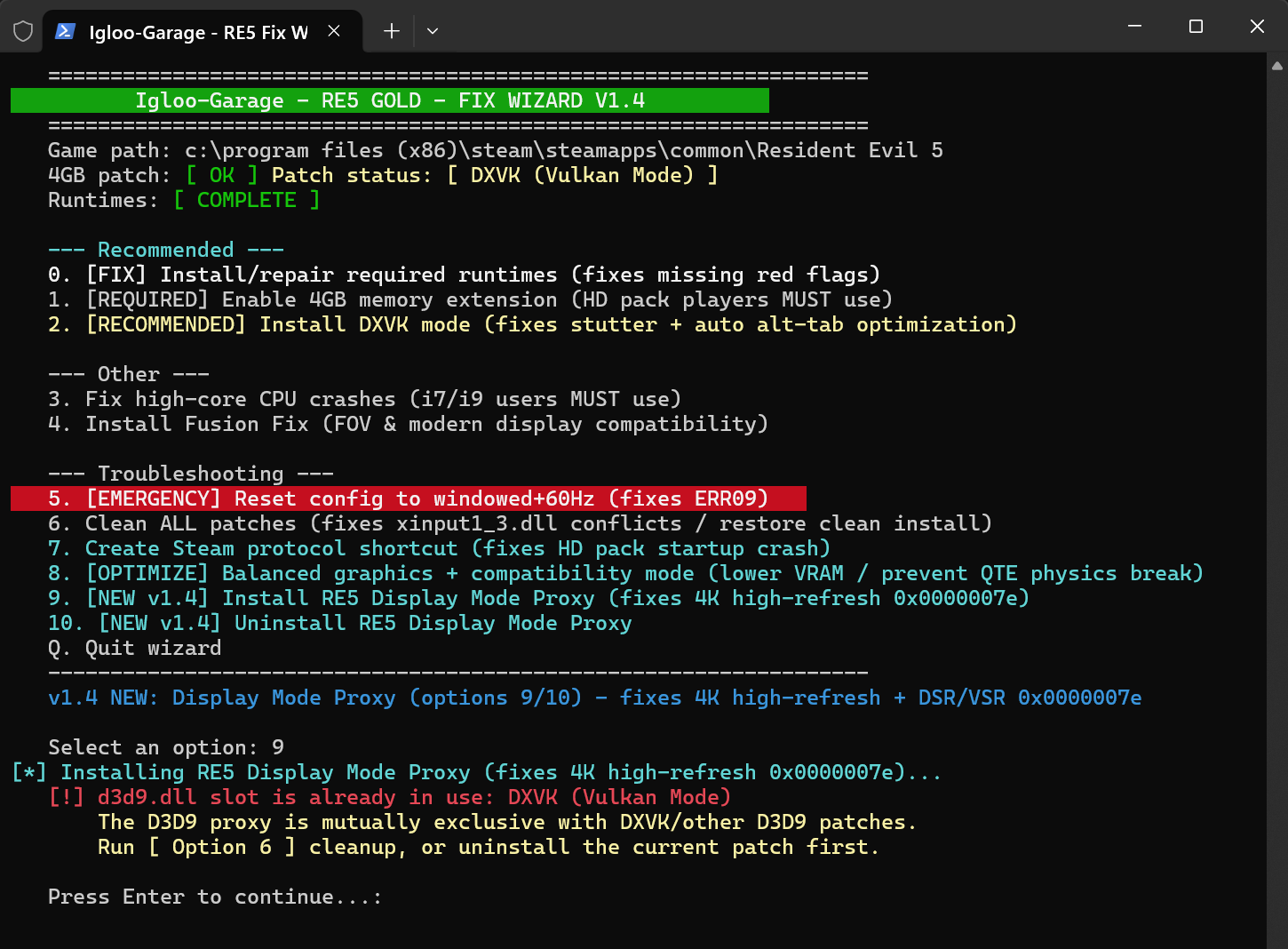 The RE5 Fix Wizard — every menu item exists because a real player hit a real wall.
What I actually learned
If you're reading this because you also build tools for old software, here's what the last few years of this project taught me:
-
The user's error message is rarely the real error.
0x0000007ewas everything: missing DLL, wrong DLL, too many modes, too many cores. You have to get under the surface and understand why the engine is fragile before you can fix anything. - The smallest fix is the best fix. The 4GB patch is one bit. The high-core fix is one config line. The proxy DLL is 30KB. None of it is "clever." It's all targeted.
- People don't want a guide, they want a button. I started with instructions. Then I realized the instructions were longer than anyone wanted to read, and every step was a place to make a mistake. The tool turned a 20-step troubleshooting thread into a number keypress.
- Backups aren't optional. Every patch the tool applies backs up the original file first. Every install can be reversed. When you're touching someone's game (and sometimes their whole system), reversibility is respect.
- Ship for the people who need you. The tool has two launchers — one for modern Windows 11 with admin elevation and Windows Terminal support, one for Windows 7 with ANSI-safe output and an execution-policy bypass. It detects the game directory from the Steam registry automatically. It explains every warning in plain language. And I built an English version of the whole thing because the fixes shouldn't be locked behind one language. Legacy games are a global hobby.
Why bother with a 15-year-old game?
People ask me this sometimes, and honestly the answer is simple: because the players are still there.
There's a whole community of people who love this game enough to keep reinstalling it, keep fighting the crashes, keep searching forums at 2am for a fix that actually works. That's not a trivial thing to ignore. When software you love is abandoned by its maker, the only thing standing between players and the experience they paid for is other people who understand the problem and are willing to fix it.
I fixed it for myself first. Then I fixed it for the people in the forums. Then I packaged it so anyone could use it.
That, honestly, is the most satisfying part of this whole project. Not the DLL. Not the script. The fact that somewhere, someone is playing RE5 on a 4K monitor at 144Hz, and the only reason it works is a 30KB file with one job.
Filed under engineering diary & gaming compatibility.